
Document scanning at your fingertips.
Getting Started
Installation
Allow installations from Unknown Sources on Android, follow these steps:
- Open your Android's Settings app.
- Scroll down and tap Security.
- Check the box next to Unknown Sources.
- Tap OK to confirm.
Make sure Google Play Services is up to date, follow these steps:
- Open your Android's Settings app.
- Tap Apps & notifications.
- Scroll down and tap Google Play Services.
- Scroll down and tap App Details.
- Tap Update or Install.
Download the apk file scanmobi.apk and install.
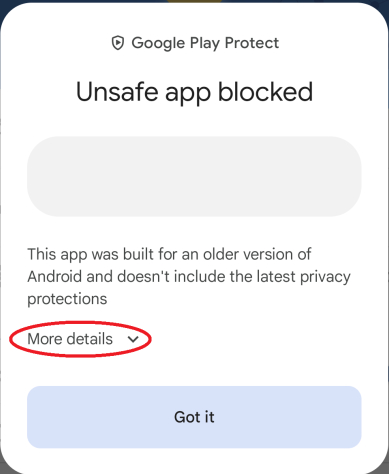
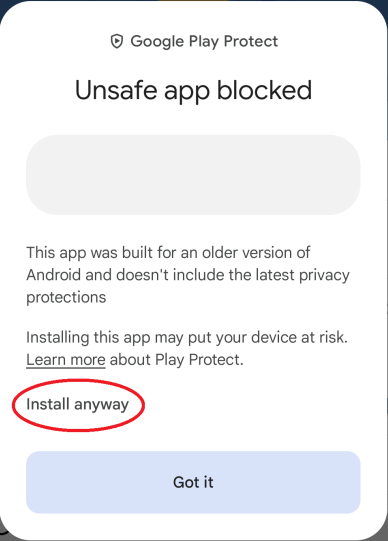
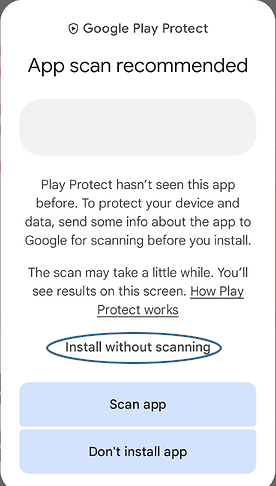
Starting with the Android 14 March 2024 security update, Google Play Protect may automatically block installations of apps targeting older Android versions and erroneously label them as unsafe. This affects both, the Scan Mobi App app downloaded from the official website. Despite being labeled as unsafe, this is a false positive alert and can be disregarded. It occurs because Scan Mobi are designed for older Android versions. To proceed with the installation, simply tap on More details and then select Install anyway or Install without scanning.
Get your Username and Password from your System Administrator.
© 2024 - Scan Mobi